
Now Reading: What Are the Instagram broadcast channels helpful tips? (2026 Edition)
-
01
What Are the Instagram broadcast channels helpful tips? (2026 Edition)


What Are the Instagram broadcast channels helpful tips? (2026 Edition)
Instagram Broadcast Channels have quickly become one of the most intriguing and talked-about features in 2026, but why are so many creators buzzing about them? Suppose you’re tired of algorithm struggles and inconsistent engagement. In that case, this new messaging tool by Instagram opens a direct, one-to-many communication channel with your most loyal followers, marking a significant step in Instagram messaging evaluation. Want to build a dedicated community through Personalized audience communication? Keep reading to learn “What Are the Instagram broadcast channels helpful tips?”
Instagram Broadcast Channels (A Direct Bridge to Your Audience’s Heart)
The broadcast feature on Instagram was introduced in 2023 and has since become a valuable asset for content creators. This capability allows you to send messages, updates, exclusive content delivery on Instagram, and calls to action directly to many of your followers within these private Instagram channels. Unlike regular stories or posts that appear in your audience’s feed and can get lost amidst a sea of content, broadcast channel messages appear directly in your followers’ Direct Messages (DMs), significantly increasing the likelihood of them being seen and helping to boost Instagram visibility. So, what are the Instagram Broadcast Channels tips that can change your Instagram world, offering powerful tools for influencer outreach?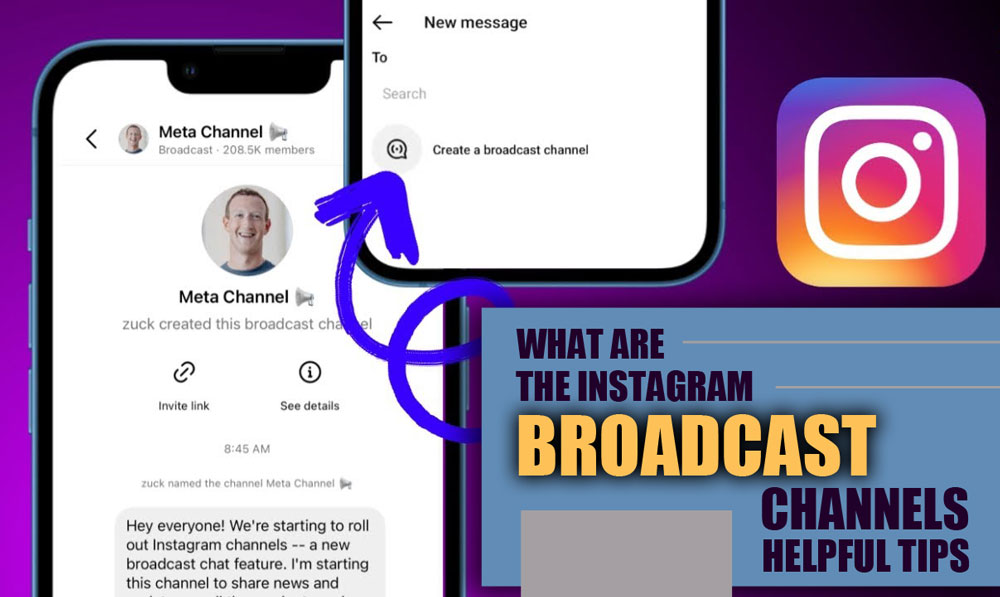
Top 10 Pro Tips to Master Instagram Broadcast Channels in 2026
Instagram Broadcast Channels aren’t just another messaging tool. They’re your digital VIP room. Think real-time updates, exclusive content drops, and direct access to your audience without algorithm interference, providing a platform for direct fan updates. Here’s how to actually use them like a pro, leveraging the latest in Instagram innovation 2026:1.Define a Clear Channel Purpose
Start strong. Is your channel for product drops, community Q&As, exclusive tutorials, or just behind-the-scenes content? Set the vibe early and keep it focused.2.Deliver Value That Feels Exclusive
The other Instagram Broadcast Channels tip is treating your channel like a subscriber-only feed. Offer early access, sneak peeks, limited offers, or insider tips your followers can’t get elsewhere.3.Use Interactive Features to Drive Engagement
Polls, Q&As, and emoji reactions aren’t just fun; they build community. Use them to make followers feel heard and keep the channel buzzing.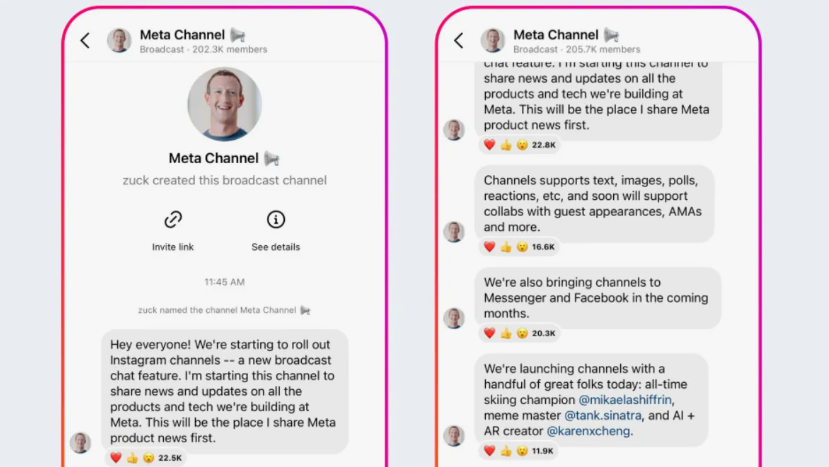
4.Stay Consistent (Without Being Spammy)
Develop a posting rhythm your followers can expect. Whether it’s 3 times a week or once every Friday, Consistency builds trust and loyalty. So, the fourth tip for Instagram Broadcast Channels is consistency.5. Promote Your Channel Creatively
Don’t assume people will find it. Use Instagram Stories, Highlights, Lives, and even bio links to hype up and drive joins.6.Learn and Adapt with Analytics
Track engagement rates, open rates, and response interactions. If engagement dips, tweak your content style or schedule accordingly.7. Segment When You Can
Cover multiple niches? Use separate channels (or future segmentation features) to send more targeted messages. It keeps the content relevant and appreciated; that is the other Instagram Broadcast Channels tip that should be considered.8. Integrate with Your Digital Strategy
Your broadcast channel shouldn’t be an island. For maximum impact, sync it with email campaigns, product launches, or social posts.9.Keep It Human, Not Robotic
The ninth Instagram Broadcast Channels tip is to keep the channel as a human environment. Speak like you would in a voice note to a friend. Drop the overly polished tone; warmth and authenticity go a long way here.10.Embrace Format Flexibility
Experiment with everything: voice notes, short videos, carousels, polls, stickers, whatever fits the message. Variety keeps attention.
Ø Bonus Benefits You’ll Unlock Along the Way
- Direct inbox access without worrying about feed algorithms.
- Stronger engagement signals that can improve overall visibility.
- Faster fan updates for events, launches, or urgent news.
- An ideal platform for influencer marketing, promotions, and campaign updates.
- A loyal, close-knit community that feels more like a fan club than a follower list.
Wrap-up
As we wrap up this journey into the evolving world of Instagram broadcast channels tip, one crucial question stands out: How will you harness this innovative tool to strengthen your connection with your audience and offer them a truly unique experience? Whether you’re just starting or already experimenting with this feature, sharing your ideas and thoughts can help us. “What Are the Instagram broadcast channels helpful tips?” What is the best use of Instagram broadcast channels?
Sharing exclusive updates, behind-the-scenes content, news, and real-time announcements with loyal followers.
Are Instagram broadcast channels still a thing?
Yes, they’re still active and widely used by influencers and brands.
Do Instagram Broadcast Channels tip make money?
You can monetize not directly, but you can do so through promotions, brand deals, or driving traffic to external sales links.
How many followers do you need for a broadcast channel?
You need at least 10,000 followers to create a broadcast channel on Instagram.
Can you have two broadcast channels on Instagram?
Yes, you can have multiple broadcast channels on Instagram to target different audiences or topics.
What is the best use of Instagram broadcast channels?
Sharing exclusive updates, behind-the-scenes content, news, and real-time announcements with loyal followers.
Are Instagram broadcast channels still a thing?
Yes, they’re still active and widely used by influencers and brands.
Do Instagram Broadcast Channels tip make money?
You can monetize not directly, but you can do so through promotions, brand deals, or driving traffic to external sales links.
How many followers do you need for a broadcast channel?
You need at least 10,000 followers to create a broadcast channel on Instagram.
Can you have two broadcast channels on Instagram?
Yes, you can have multiple broadcast channels on Instagram to target different audiences or topics.
2026 Practical Update
Broadcast Channels now work best when they feel like a direct update stream, not another public feed. Treat the channel as a place for short announcements, behind-the-scenes notes, launches, reminders, and quick polls. Followers join because they want signal, so avoid reposting every feed post or turning the channel into a chat-style flood.
Before You Try It
- Open with a clear promise for what subscribers will receive.
- Use short updates that can be understood without extra context.
- Pin or repeat important launch details when timing matters.
- Use polls and reactions to learn what your audience wants next.
- Keep promotional messages balanced with useful updates.
Quick Answers
Are Broadcast Channels good for small accounts? Yes, if the audience already trusts the creator. A small but focused channel can drive better repeat engagement than a large unfocused feed.
Should every post be shared to a channel? No. Share only the updates that benefit from direct notification and quick attention.
A useful channel also needs a rhythm. Tell followers when you usually post updates, then keep that promise. If you only post during launches, say so. If you share weekly tips, make the updates predictable. This helps people decide whether to stay subscribed and reduces the chance that your messages feel random or intrusive.
Before inviting followers, prepare at least three starter updates so the channel does not feel empty. A welcome note, a short explanation of what members will receive, and one useful exclusive tip can make the first experience clearer. This also gives new subscribers a reason to keep notifications enabled instead of muting the channel immediately.
For better long-term results, review channel performance monthly. Look at reactions, replies, link taps, and whether subscribers stay after promotional updates. If people leave after every sales message, add more useful previews, reminders, or behind-the-scenes context before the next promotion.
Related Instagram Guides
For more context and next steps, these Notisave guides cover closely related Instagram questions and tools.













TRANSFER
Hello, your content is very good I used your Instagram DP profile Downloader
notisave
I’m glad it was useful for you.
Antesh
Love you